Configure IAM Permissions for ACK Controllers
ACK controllers need AWS IAM permissions to manage resources. This guide shows you how to configure IAM permissions using either EKS Pod Identity (recommended for EKS 1.24+) or IRSA (traditional method).
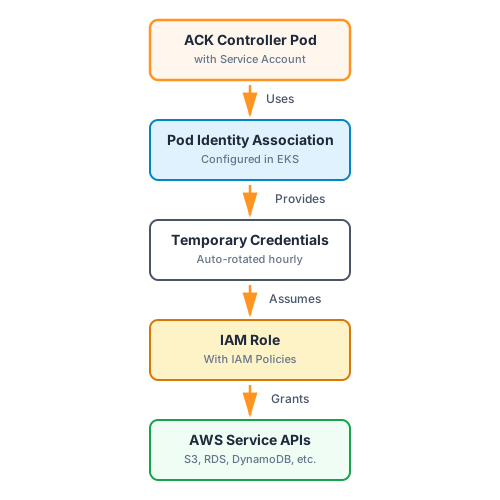
Click to zoom • Pod Identity authentication flow
Choose Your Authentication Method
- Pod Identity (Recommended)
- IRSA
What is Pod Identity?
EKS Pod Identity is a feature that allows pods running in your EKS cluster to assume AWS IAM roles without requiring OIDC configuration. It simplifies the authentication flow by using the EKS Pod Identity Agent, which runs as a DaemonSet in your cluster and handles credential requests automatically.
How It Works
-
You create a Pod Identity Association that links:
- An IAM role (with AWS service permissions)
- A Kubernetes service account (used by the ACK controller)
- A namespace (where the controller runs)
-
When the ACK controller pod starts with this service account, the Pod Identity Agent automatically provides temporary AWS credentials
-
The controller uses these credentials to manage AWS resources
Pod Identity Association
A Pod Identity Association is an EKS resource that connects your controller's service account to an IAM role. Here's what it looks like:
apiVersion: eks.services.k8s.aws/v1alpha1
kind: PodIdentityAssociation
metadata:
  name: ack-s3-controller-pod-identity
spec:
  clusterName: my-cluster
  namespace: ack-system
  serviceAccount: ack-s3-controller
  roleARN: arn:aws:iam::123456789012:role/ack-s3-controller
Key components:
clusterName: Your EKS cluster namenamespace: Where your ACK controller runs (typicallyack-system)serviceAccount: The service account used by the controller (auto-created during installation)roleARN: The IAM role with permissions for the AWS service
You can create this using either:
- AWS CLI:
aws eks create-pod-identity-association - ACK EKS Controller: Create a
PodIdentityAssociationCRD (shown above)
Example Configuration
Here's a complete example for configuring the S3 controller with Pod Identity:
# Variables
export SERVICE=s3
export CLUSTER_NAME=my-cluster
export AWS_REGION=us-west-2
export ACK_SYSTEM_NAMESPACE=ack-system
export AWS_ACCOUNT_ID=$(aws sts get-caller-identity --query "Account" --output text)

# Create Pod Identity Association
aws eks create-pod-identity-association \
  --cluster-name $CLUSTER_NAME \
  --namespace $ACK_SYSTEM_NAMESPACE \
  --service-account ack-${SERVICE}-controller \
  --role-arn arn:aws:iam::${AWS_ACCOUNT_ID}:role/ack-${SERVICE}-controller \
  --region $AWS_REGION

# Restart controller to pick up the association
kubectl rollout restart deployment -n $ACK_SYSTEM_NAMESPACE \
  ack-${SERVICE}-controller
Or using the ACK EKS controller:
apiVersion: eks.services.k8s.aws/v1alpha1
kind: PodIdentityAssociation
metadata:
  name: ack-s3-controller-pod-identity
spec:
  clusterName: my-cluster
  namespace: ack-system
  serviceAccount: ack-s3-controller
  roleARN: arn:aws:iam::123456789012:role/ack-s3-controller
Creating the IAM Role (expand for details)
Before creating the Pod Identity Association, you need an IAM role with the appropriate permissions.
Step 1: Create IAM Role with Pod Identity Trust Policy
export SERVICE=s3
export AWS_ACCOUNT_ID=$(aws sts get-caller-identity --query "Account" --output text)

# Create IAM role with Pod Identity trust policy
aws iam create-role \
  --role-name ack-${SERVICE}-controller \
  --assume-role-policy-document '{
    "Version": "2012-10-17",
    "Statement": [{
      "Effect": "Allow",
      "Principal": {"Service": "pods.eks.amazonaws.com"},
      "Action": ["sts:AssumeRole", "sts:TagSession"]
    }]
  }'
Step 2: Attach AWS Service Permissions
# Get recommended policy for your service
export POLICY_ARN=$(curl -s https://raw.githubusercontent.com/aws-controllers-k8s/${SERVICE}-controller/main/config/iam/recommended-policy-arn)

# Attach the policy
aws iam attach-role-policy \
  --role-name ack-${SERVICE}-controller \
  --policy-arn $POLICY_ARN
Step 3: Attach Inline Policies (if needed)
Some controllers need additional inline policies (like iam:PassRole):
# Check if inline policy exists
curl -s https://raw.githubusercontent.com/aws-controllers-k8s/${SERVICE}-controller/main/config/iam/recommended-inline-policy > inline-policy.json

# If the file exists and has content, apply it
if [ -s inline-policy.json ]; then
  aws iam put-role-policy \
    --role-name ack-${SERVICE}-controller \
    --policy-name ack-${SERVICE}-inline \
    --policy-document file://inline-policy.json
fi
Verify
Check that the Pod Identity Association was created:
aws eks list-pod-identity-associations \
  --cluster-name $CLUSTER_NAME \
  --region $AWS_REGION

# Check controller logs
kubectl logs -n $ACK_SYSTEM_NAMESPACE deployment/ack-${SERVICE}-controller
What is IRSA?
IAM Roles for Service Accounts (IRSA) uses OpenID Connect (OIDC) to allow Kubernetes service accounts to assume AWS IAM roles. It's the traditional method for providing AWS permissions to pods in EKS.
How It Works
- Your EKS cluster has an OIDC provider that acts as an identity provider
- You create an IAM role with a trust policy that trusts your cluster's OIDC provider
- You annotate the Kubernetes service account with the IAM role ARN
- When pods use this service account, they can assume the IAM role and get temporary AWS credentials
Service Account Annotation
With IRSA, you link an IAM role to a service account using an annotation:
apiVersion: v1
kind: ServiceAccount
metadata:
  name: ack-s3-controller
  namespace: ack-system
  annotations:
    eks.amazonaws.com/role-arn: arn:aws:iam::123456789012:role/ack-s3-controller
This annotation tells EKS to provide credentials for the specified IAM role when pods use this service account.
Example Configuration
Here's a complete example for configuring the S3 controller with IRSA:
# Variables
export SERVICE=s3
export CLUSTER_NAME=my-cluster
export AWS_REGION=us-west-2
export ACK_SYSTEM_NAMESPACE=ack-system
export AWS_ACCOUNT_ID=$(aws sts get-caller-identity --query "Account" --output text)

# Get OIDC provider URL
export OIDC_PROVIDER=$(aws eks describe-cluster --name $CLUSTER_NAME \
  --region $AWS_REGION \
  --query "cluster.identity.oidc.issuer" \
  --output text | sed -e "s/^https:\/\///")

# Annotate service account
kubectl annotate serviceaccount -n $ACK_SYSTEM_NAMESPACE \
  ack-${SERVICE}-controller \
  eks.amazonaws.com/role-arn=arn:aws:iam::${AWS_ACCOUNT_ID}:role/ack-${SERVICE}-controller

# Restart controller to pick up the annotation
kubectl rollout restart deployment -n $ACK_SYSTEM_NAMESPACE \
  ack-${SERVICE}-controller
Setting up OIDC and IAM Role (expand for details)
Before using IRSA, you need to set up the OIDC provider and create an IAM role.
Step 1: Enable OIDC Provider (if not already enabled)
export CLUSTER_NAME=my-cluster
export AWS_REGION=us-west-2

# Check if OIDC provider exists
aws eks describe-cluster --name $CLUSTER_NAME --region $AWS_REGION \
  --query "cluster.identity.oidc.issuer" --output text

# If not configured, create it with eksctl
eksctl utils associate-iam-oidc-provider \
  --cluster=$CLUSTER_NAME \
  --region=$AWS_REGION \
  --approve
Step 2: Create IAM Role with OIDC Trust Policy
export SERVICE=s3
export ACK_SYSTEM_NAMESPACE=ack-system
export AWS_ACCOUNT_ID=$(aws sts get-caller-identity --query "Account" --output text)
export OIDC_PROVIDER=$(aws eks describe-cluster --name $CLUSTER_NAME \
  --region $AWS_REGION \
  --query "cluster.identity.oidc.issuer" \
  --output text | sed -e "s/^https:\/\///")

# Create trust policy
cat > trust-policy.json <<EOF
{
  "Version": "2012-10-17",
  "Statement": [{
    "Effect": "Allow",
    "Principal": {
      "Federated": "arn:aws:iam::${AWS_ACCOUNT_ID}:oidc-provider/${OIDC_PROVIDER}"
    },
    "Action": "sts:AssumeRoleWithWebIdentity",
    "Condition": {
      "StringEquals": {
        "${OIDC_PROVIDER}:sub": "system:serviceaccount:${ACK_SYSTEM_NAMESPACE}:ack-${SERVICE}-controller",
        "${OIDC_PROVIDER}:aud": "sts.amazonaws.com"
      }
    }
  }]
}
EOF

# Create the role
aws iam create-role \
  --role-name ack-${SERVICE}-controller \
  --assume-role-policy-document file://trust-policy.json
Step 3: Attach AWS Service Permissions
# Get recommended policy
export POLICY_ARN=$(curl -s https://raw.githubusercontent.com/aws-controllers-k8s/${SERVICE}-controller/main/config/iam/recommended-policy-arn)

# Attach the policy
aws iam attach-role-policy \
  --role-name ack-${SERVICE}-controller \
  --policy-arn $POLICY_ARN
Step 4: Attach Inline Policies (if needed)
# Check if inline policy exists
curl -s https://raw.githubusercontent.com/aws-controllers-k8s/${SERVICE}-controller/main/config/iam/recommended-inline-policy > inline-policy.json

# If the file exists and has content, apply it
if [ -s inline-policy.json ]; then
  aws iam put-role-policy \
    --role-name ack-${SERVICE}-controller \
    --policy-name ack-${SERVICE}-inline \
    --policy-document file://inline-policy.json
fi
Verify
Check that the service account has the annotation:
# Check service account annotation
kubectl get sa -n $ACK_SYSTEM_NAMESPACE ack-${SERVICE}-controller -o yaml

# Check controller logs
kubectl logs -n $ACK_SYSTEM_NAMESPACE deployment/ack-${SERVICE}-controller
Finding Quick-Setup Policies
Each ACK controller repository publishes IAM policies intended for quick setup. These are broad AWS managed policies that get a controller running fast. They are a convenient starting point, not a production-ready least-privilege configuration:
# Policy ARN (AWS managed policy)
https://raw.githubusercontent.com/aws-controllers-k8s/${SERVICE}-controller/main/config/iam/recommended-policy-arn

# Inline policy (additional permissions)
https://raw.githubusercontent.com/aws-controllers-k8s/${SERVICE}-controller/main/config/iam/recommended-inline-policy
Examples:
- S3:
arn:aws:iam::aws:policy/AmazonS3FullAccess - DynamoDB:
arn:aws:iam::aws:policy/AmazonDynamoDBFullAccess - RDS:
arn:aws:iam::aws:policy/AmazonRDSFullAccess
For production, create custom policies with least-privilege permissions instead of using *FullAccess policies.
Granular IAM Role Scoping
By default, an ACK controller uses a single IAM role for every resource it reconciles. If that role is broadly permissioned, any resource the controller acts on can use all of those permissions, and anyone able to create a custom resource the controller watches can drive it to act with that role's full access. This matters whenever different workloads need different permissions, for example:
- A shared cluster where multiple teams or tenants create ACK resources and should be isolated from one another.
- A single team running multiple applications that manage different resource types and shouldn't share one broad role.
- Resources that need to be reconciled into different AWS accounts.
To scope permissions narrowly instead of relying on one wide role:
- Scope the default controller role to least-privilege. This role is the fallback used when no
IAMRoleSelectormatches a resource, so grant it only the permissions those unmatched resources need (or nothing beyond a baseline needed to assume roles specified by IAMRoleSelectors). - Use the
IAMRoleSelectorto map distinct IAM roles to specific namespaces, resource types, and/or accounts, so each resource is reconciled with a role limited to the permissions it needs.
Because an IAMRoleSelector maps a role to whatever matches its selectors, isolation also depends on your Kubernetes RBAC. RBAC is namespace-scoped, so restrict who can create ACK resources in each namespace that a selector maps a role to. That way a workload can only reach the role intended for its namespace. If you select namespaces by label, also control who can apply those labels to namespaces. Matching the RBAC scope to the selector scope is what actually provides isolation.
See Granular IAM Roles for how to configure roles with IAMRoleSelector.